Fast Checkout
Build a cart and complete sales quickly.

POINT OF SALE
Sell, return, manage payments, customer credit, gift cards, receipts and daily cashier activity from one fast retail workspace — even when the internet goes down.
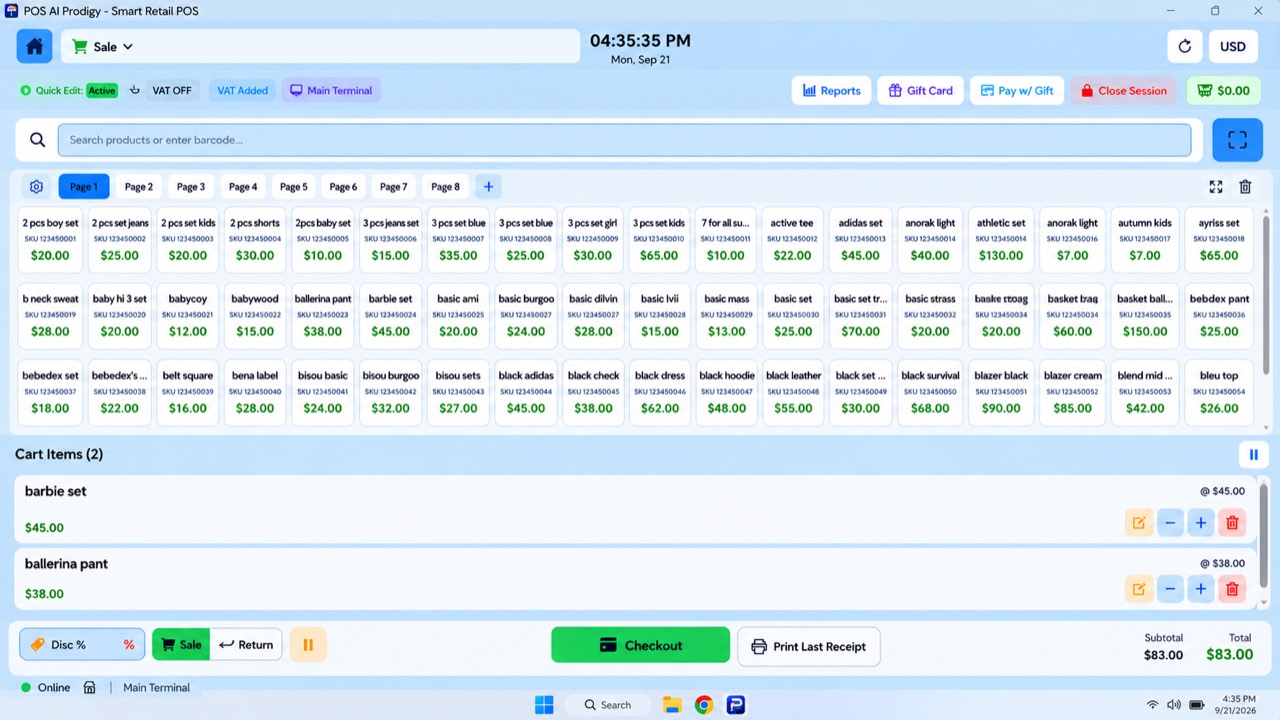
POS Prodigy brings products, cart controls, checkout, payments and day-to-day cashier actions together in one retail workspace.
Cashiers can search for products or enter/scan barcodes, add products to the cart, adjust quantities and move directly into checkout without navigating through multiple disconnected screens.
The POS interface is designed for fast counter operation while keeping the sale connected to inventory, receipts, customer credit and the financial side of the business.
Products can be found from the POS using product search or barcode entry/scanning.
The POS interface can also display products as quick-access product tiles, allowing commonly sold inventory to be added to the cart with minimal interaction.
Multiple product pages/tabs keep a large catalog accessible directly from the selling screen.
The cashier can build the cart while remaining inside the POS workspace.
Products added to the sale appear in the cart with their price and quantity controls.
The cashier can adjust quantities or remove products before checkout.
The cart continuously displays the current subtotal and total so the cashier can see the value of the sale before completing it.
POS Prodigy keeps the checkout workflow connected to the underlying inventory so a completed sale updates the business records rather than existing as an isolated transaction.
At checkout, POS Prodigy supports the core payment methods used by the business:
When the sale is completed, POS Prodigy records the transaction, updates inventory and routes the payment according to the payment method.
Cash payments are associated with the Cash Drawer.
Card payments are routed to the Management Account.
Credit sales are connected to the customer’s outstanding balance.
The sale operation is designed to update the related records together rather than requiring the cashier to manually update inventory or customer balances after checkout.
Customer credit is part of the checkout workflow rather than a separate external process.
When Credit is selected as the payment method, customer information is required so the outstanding amount can be associated with the correct customer.
POS Prodigy can also handle a partial payment during a credit sale.
For example, a customer can pay part of the transaction immediately and leave the remaining amount as credit.
A partial payment can be taken using:
The remaining amount becomes customer credit.
During checkout, the cashier can see the Paid Now and Remaining Credit amounts before completing the sale.
A busy counter does not always finish one customer before helping another.
POS Prodigy allows the cashier to hold the current cart and temporarily move it out of the active checkout.
A held cart can later be retrieved and returned to the selling screen so checkout can continue.
When held carts exist, the POS can display the number of carts waiting to be resumed.
This allows the cashier to move between customer transactions without having to rebuild an unfinished cart from the beginning.
POS Prodigy includes return workflows designed to keep returned products, customer balances and the original transaction connected.
For customer-credit purchases, returnable items can be selected from the customer’s transaction history or invoice details.
The user selects the products and quantities being returned and confirms the return.
The system prevents returning a quantity greater than the quantity originally sold.
For credit-sale returns, the customer’s outstanding balance is adjusted accordingly.
Gift cards are built directly into the POS.
A gift card can be created by entering the receiver, value and payment information.
POS Prodigy generates a gift-card code that can be printed for the customer.
At checkout, the cashier can scan or enter a valid gift-card code and apply its available balance toward the current sale.
If the gift-card balance is smaller than the transaction total, the remaining amount can be completed using another supported payment method.
Gift-card redemption acts as a payment method for the current sale.
Completed sales create receipts that remain available inside POS Prodigy.
Receipts can be searched and filtered using information such as customer/name, date, items or amount.
Available date filters can include:
A stored receipt can be opened in a read-only view and reprinted when needed.
Reprinting a receipt does not repeat or modify the original transaction and does not change the Cash Drawer.
POS Prodigy supports receipt-printer and cash-drawer workflows for physical retail counters.
Receipt printing can work with configured operating-system printer queues, including common thermal receipt formats such as 58mm and 80mm.
When configured through the Electron desktop application, POS Prodigy can also work with supported cash drawers connected through the receipt-printer workflow.
This allows the software side of checkout to work together with the physical hardware used at the counter.
POS Prodigy supports cashier/session-based operation.
The cashier can work inside an active session while sales and counter activity remain associated with that working period.
Logging out does not automatically close the active shift.
A cashier can log back in using the appropriate PIN and resume an existing open session.
Closing the session is a separate POS action, helping distinguish simply leaving the terminal from actually ending the cashier’s working session.
POS Prodigy is built around an offline-first retail architecture.
The core register runs on the shop’s own device instead of depending entirely on a permanent internet connection.
Core operational areas are designed to continue working locally, including areas such as:
When connectivity returns, supported records can synchronize with the cloud in the background.
This means an internet interruption does not have to become a checkout interruption.
POS Prodigy connects what happens at the counter with the rest of the business. A completed transaction is not just a receipt — it becomes part of inventory, customer credit where applicable, cashier activity and business reporting.
Build a cart and complete sales quickly.
Find products using search or barcode entry/scanning.
Use product tiles/pages for fast access to inventory.
Support the payment methods used at the counter.
Take part of a credit sale now and leave the remainder on the customer balance.
Pause unfinished sales and retrieve them later.
Process supported product returns while preserving transaction history.
Sell gift cards and redeem their balances during checkout.
Keep searchable transaction history and reprint receipts when needed.
Connect cash activity with the physical selling workflow.
Keep cashier activity organized by working session.
Continue core POS operations even during an internet interruption.
BUILT FOR THE COUNTER
From the first barcode scan to the final receipt, POS Prodigy keeps your checkout connected to the rest of your business.