
FINANCIALS
Know Where Your Business Stands.
Sales are only part of the story. POS Prodigy connects revenue, cost of goods, expenses, VAT, customer credit and business balances to show what your business is actually making.
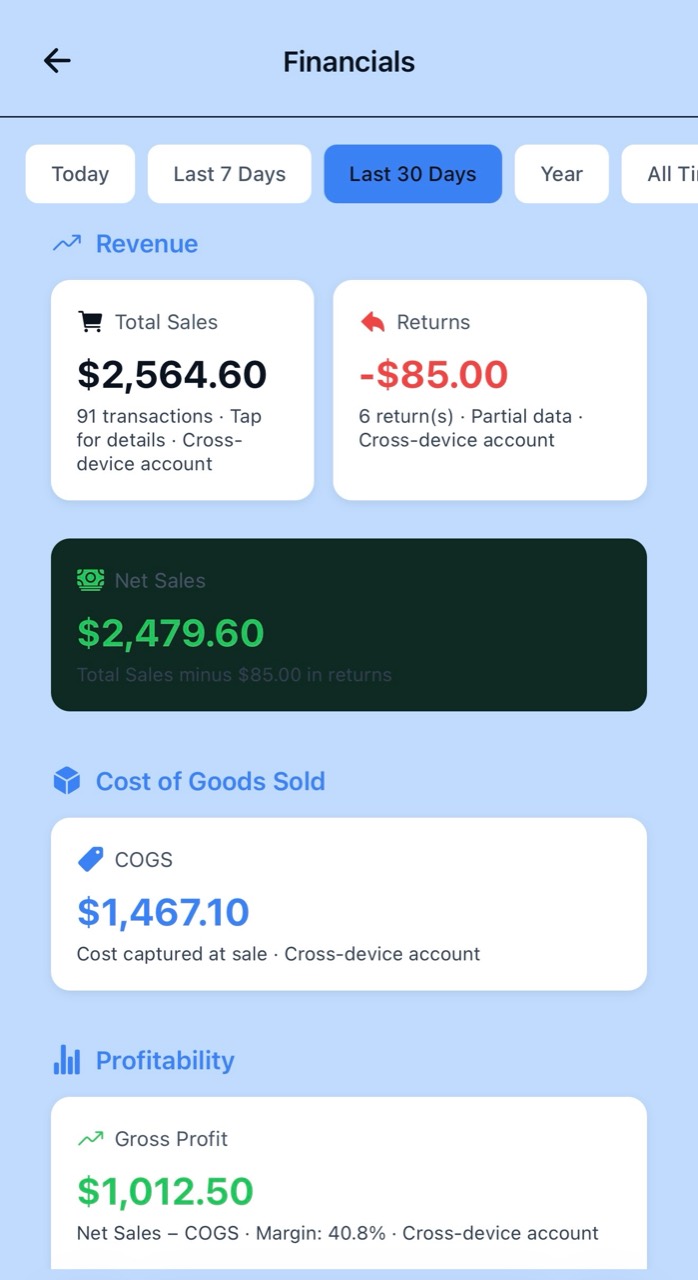
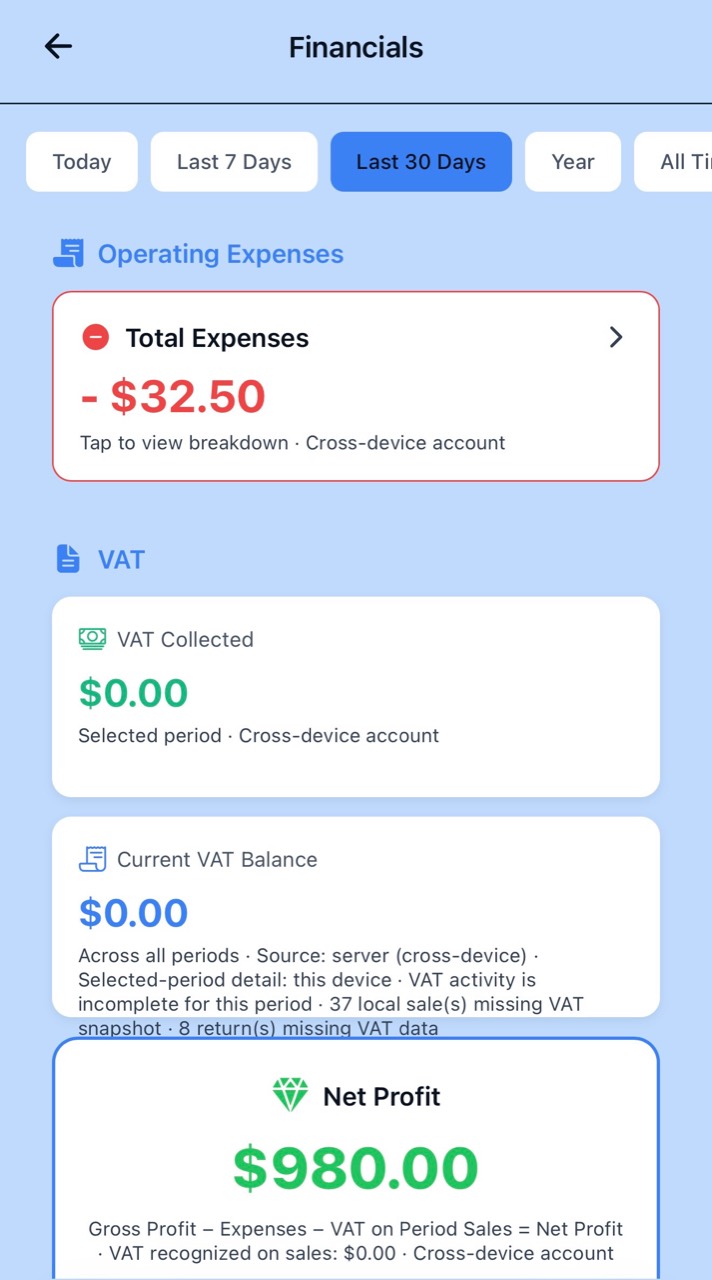
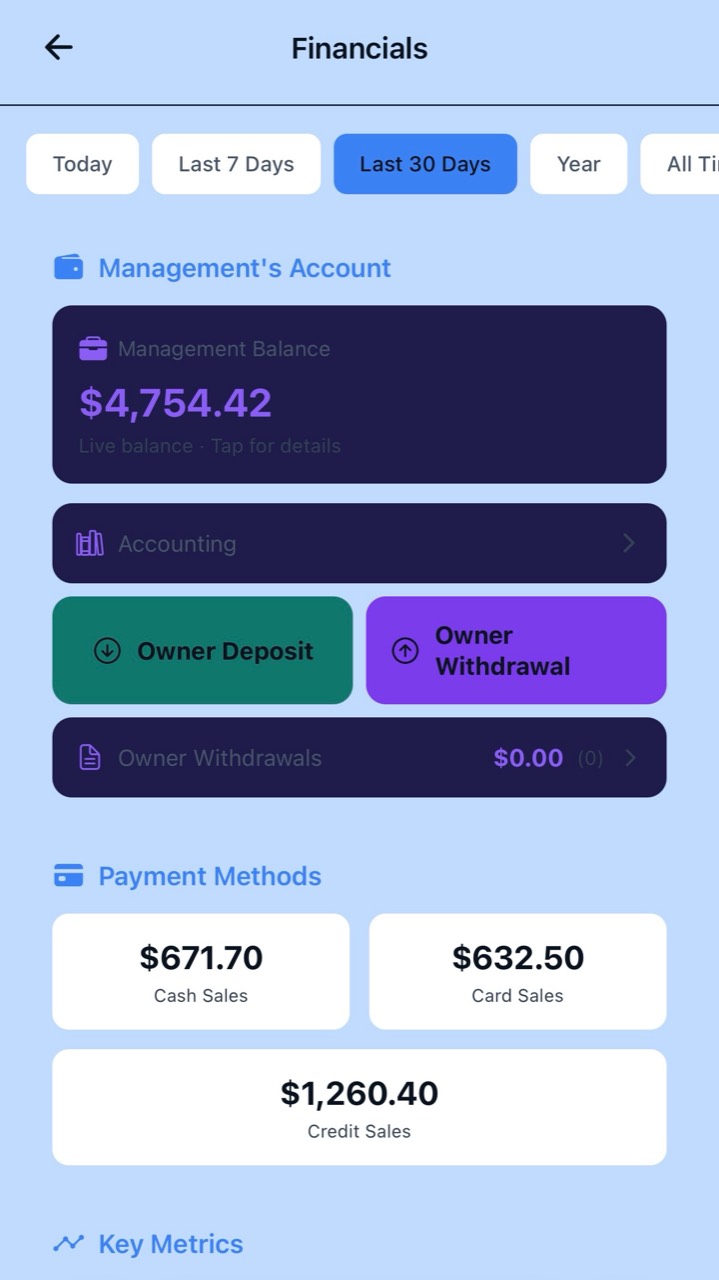
Scroll horizontally within a screenshot to read every detail.
See the Numbers for the Period That Matters
Financials lets the owner or manager analyze business performance across different time periods.
Available period controls include:
- Today
- Last 7 Days
- Last 30 Days
- Year
- All Time
- Custom Date Range
Last 7 Days and Last 30 Days are rolling periods including today.
Year represents the current calendar year to date.
The Financials page opens on Last 30 Days by default.
Start With What You Sold
The Revenue section shows the sales activity for the selected period.
It brings together:
- Total Sales
- Transaction Count
- Returns
- Net Sales
Net Sales reflects sales after recorded returns, helping the owner distinguish between what was originally sold and the revenue remaining after returns.
Where supported by the displayed data, individual figures can be opened for additional detail.
Know What Those Sales Actually Cost
Revenue alone does not tell you how profitable the business is.
POS Prodigy tracks Cost of Goods Sold — COGS — using the recorded cost associated with sold inventory.
This allows Financials to compare what the business sold with what those products actually cost.
COGS becomes the bridge between sales revenue and real gross profit.
Where the final authoritative cost calculation is still being resolved, POS Prodigy can clearly identify provisional/server-estimated profit information rather than silently presenting uncertain figures as final.
See the Profit Behind the Sales
POS Prodigy uses Net Sales and Cost of Goods Sold to calculate Gross Profit.
The Financials view can show:
- Net Sales
- COGS
- Gross Profit
- Gross Margin
- Operating Expenses
- VAT / Tax
- Net Profit
This gives the owner a much clearer view than sales totals alone.
A business may have strong sales while also carrying high product costs or operating expenses.
Financials brings those numbers together so the owner can understand what remains after the costs of running the business.
See What Running the Business Costs
Operating expenses are integrated into the financial picture.
Expenses recorded in POS Prodigy contribute to the selected period’s profitability view.
The owner can see Total Expenses and open the expense breakdown for additional detail.
Expenses can be recorded with categories and payment information so they are not treated simply as an unexplained reduction in cash.
Supported expense payment sources include the Cash Drawer and Management Account where applicable.
A drawer-funded expense reduces the amount recorded in the Cash Drawer.
A Management Account-funded expense reduces the Management Account instead.
This keeps expenses connected to where the money actually came from.
Keep VAT Visible
Financials includes VAT information as part of the business overview.
The Financials experience can display:
- VAT Collected for the selected period
- Current VAT Balance
- VAT information associated with sales
- Data-completeness information where VAT history is incomplete
POS Prodigy should not hide incomplete tax data.
When historical transactions do not contain complete VAT information, the interface can identify that limitation so the owner understands the context behind the displayed figures.
The Number That Brings It Together
Net Profit brings together the major components of business performance.
Instead of looking only at sales, POS Prodigy considers the relationship between revenue, product cost, operating expenses and applicable VAT.
This gives the owner a clearer view of what the business generated after the costs represented in the Financials calculation.
Know Where Non-Cash Money Is Going
POS Prodigy includes a Management Account as part of its financial system.
The Management Account provides a live balance for funds routed outside the physical Cash Drawer.
For example, supported non-cash payment activity and management-funded transactions can be reflected through this account.
The Financials page gives the owner direct visibility into the current Management Account balance and its accounting activity.
Separate Owner Money From Business Expenses
Financials includes dedicated owner money controls.
An owner can record an Owner Deposit or Owner Withdrawal so movements of owner funds are not incorrectly treated as ordinary business sales or operating expenses.
For an Owner Withdrawal, the owner enters the amount and can provide an optional reason or note.
The withdrawal reduces the Management Account balance and is recorded in the accounting ledger as an owner withdrawal.
An owner withdrawal is NOT treated as a business expense.
POS Prodigy also prevents a withdrawal greater than the available Management Account balance.
This helps preserve the distinction between:
See How Your Customers Paid
Financials breaks sales down by payment method so the owner can understand how revenue was collected.
The payment-method view can include:
- Cash Sales
- Card Sales
- Credit Sales
This connects the sales picture with the way money and receivables actually entered the business.
Cash activity is associated with the Cash Drawer.
Card activity is associated with the appropriate management-side account.
Credit Sales represent amounts connected to customer receivables rather than immediate full payment.
Credit Is Part of the Financial Picture
Customer credit is integrated into POS Prodigy rather than being kept in a separate notebook or disconnected system.
Credit sales create customer receivables.
Payments against those balances and supported credit returns update the customer’s financial position.
Accounts Receivable is included in POS Prodigy’s accounting summary so money still owed by customers remains visible as part of the broader business picture.
Accounting Connected to Daily Operations
The Accounting section gives POS Prodigy a consolidated financial view built from the transactions happening throughout the system.
Accounting Summary & Transactions can bring together financial activity such as:
- Revenue
- Cost of Goods Sold
- Gross Profit
- Expenses by Category
- Owner Withdrawals
- Accounts Receivable
- Net Income
- Sales Transactions
- Expense Transactions
- Withdrawal Transactions
Instead of requiring the owner to manually reconstruct these movements from separate screens, POS Prodigy brings supported financial activity together into an accounting view.
Your Financial Records Start on the Device
POS Prodigy uses a local-first accounting architecture.
Its device-authoritative accounting ledger supports core money activity such as:
- Sales
- Returns
- Cash Drawer movements
- Management Account movements
- Customer Credit
- Expenses
The ledger is append-oriented and designed to preserve the financial events recorded by the POS.
The cloud does not simply overwrite the device-authoritative money ledger.
This architecture supports POS Prodigy’s offline-first approach and helps keep core financial operations available even when internet connectivity is interrupted.
From Sale to Financial Picture
- SALE
- PAYMENT METHOD
- NET SALES
- COST OF GOODS
- GROSS PROFIT
- OPERATING EXPENSES
- VAT
- NET PROFIT
More Than a Sales Report
Financials is designed to answer a more important question than simply “How much did I sell?”
It helps the business understand:
- “How much did I sell?”
- “What did those products cost?”
- “How much was returned?”
- “What did I spend?”
- “What VAT is associated with the period?”
- “How much gross profit did I make?”
- “What is my net profit?”
- “How were customers paying?”
- “What is in the Management Account?”
- “What is still owed by customers?”
By connecting these areas, POS Prodigy turns everyday POS activity into a financial picture the owner can actually use.
Financial Information for Management
The Financials page is intended for management-level access.
Owners and authorized managers can access the Financials view.
Cashiers do not receive access to the full Financials page.
Sensitive owner actions such as Owner Withdrawal remain restricted to the owner.
KNOW YOUR NUMBERS
See More Than Sales.
Understand your revenue, costs, expenses, VAT, payment methods and profit from the same system running your business.