Available now
Turn Your Business Data Into Marketing
Plan smarter campaigns, create promotional content and media, reach customers on WhatsApp, and prepare content for Instagram and Facebook — all from POS Prodigy.
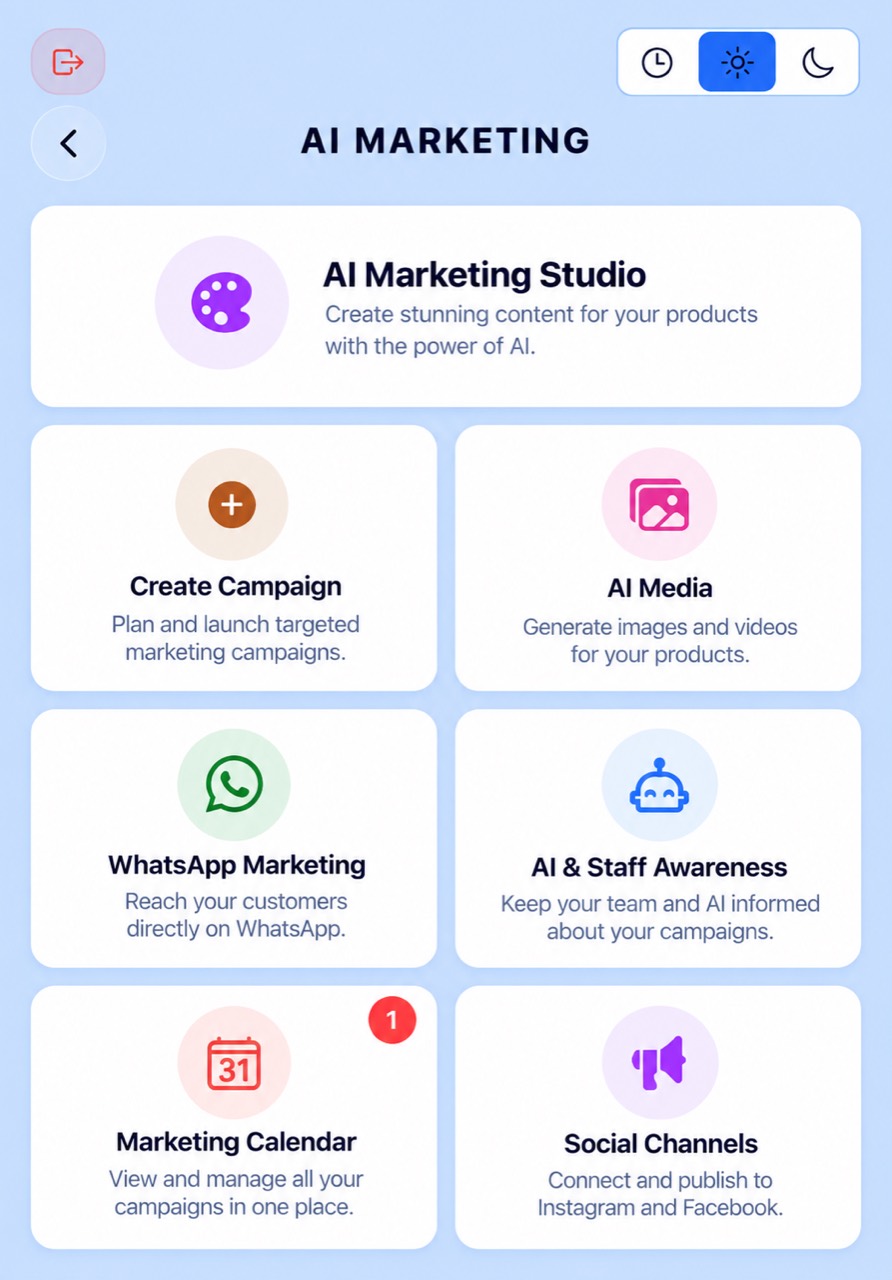
Your AI Marketing Studio
AI Marketing brings campaign planning, content creation, AI-generated media and customer outreach together inside POS Prodigy.
Instead of starting every promotion from scratch, AI Marketing can help build campaigns around the products your business actually sells.
Campaigns can begin with AI-generated ideas based on your inventory or can be created manually with products and offers selected by you.
From there, POS Prodigy can help prepare captions, images and videos and move the finished campaign toward WhatsApp, Instagram and Facebook.
Campaigns Built Around Your Business
AI Marketing gives you two ways to start a campaign: AI-Suggested Campaign or Custom Campaign.
With AI-Suggested Campaign, POS Prodigy’s Campaign Planner uses your actual inventory context to help propose relevant marketing opportunities.
Campaign ideas can include areas such as:
- Clearance
- Bundles
- New Arrivals
- High-Margin Products
- Limited Stock
- Seasonal Campaigns
- Promotions designed to help move slow or dead stock
The suggested campaign is not automatically published.
You remain in control of what products are included. You can review the suggestion, add products, remove products or refresh the recommendation before continuing.
For complete control, Custom Campaign lets you create the campaign yourself.
You can provide:
- Campaign name
- Offer
- Objective
- Target
- Selected products
- Product media
- Intended social channels
Products are selected from your real POS Prodigy inventory instead of allowing the AI to invent products that your business does not sell.
When the campaign is ready, it can be opened in Content Studio.
Create Content for Every Channel
Content Studio turns your campaign into customer-facing marketing content.
Choose the type of content you want to prepare:
- Instagram Post
- Instagram Story
- Caption
- Poster
You can also choose the tone of the campaign before generating the content.
AI Marketing then creates promotional copy around the actual products included in the campaign.
The goal is to keep generated marketing grounded in your real campaign and products instead of inventing products, prices or promotions that were never selected.
You can review and refine the content before moving it to a publishing channel.
Turn Real Products Into Marketing Content
AI Media is the visual content workspace inside AI Marketing.
You can begin with:
- A product already stored in your inventory
- An existing product image
- An uploaded image
- A product selected by barcode
The selected image can then become the source for AI-generated promotional media.
Your uploaded and generated media is kept inside the AI Media library, where it can later be attached to campaigns.
Generate Marketing Images From Your Products
POS Prodigy can use a real product image as the starting point for a new promotional creative.
The Image Style Settings allow the owner to control the creative direction using:
- Product prompt
- Model / style prompt
- Aspect ratio
- Edit mode
- Intended platform
Before rendering, POS Prodigy can preview the assembled AI prompt.
Generating the image creates a new promotional image and saves it to the AI Media library.
Image-to-image generation is designed to keep the real product from the selected source image while creating a new marketing presentation around it.
Turn Product Images Into Marketing Videos
AI Marketing can also create short promotional videos from product images.
A video can start from:
- A campaign image
- An inventory product image
- An uploaded image
- A newly generated AI image
The owner can configure the creative direction and choose settings such as platform format and video duration.
Supported generated video duration is approximately 3–15 seconds.
POS Prodigy tracks the generation process through stages such as:
Queued → Generating → Persisting → Completed
The completed video is saved to the AI Media library and can then be attached to a campaign.
This creates a workflow such as:
Real Product → Product Photo → AI Marketing Image → Marketing Video → Campaign
Send Campaigns Directly to Your Customers
WhatsApp Marketing lets a business send finished campaigns using its own connected WhatsApp identity.
Select an existing campaign, review its content and choose the customers who should receive it.
Before sending, the owner can review or edit the campaign message.
A “Tailor for WhatsApp” option can optimize the campaign copy for a WhatsApp conversation while keeping the original campaign as its source.
Customers can be searched and selected individually.
Only customers with an eligible WhatsApp number can be selected.
The current broadcast workflow supports up to 100 selected customers per broadcast.
After sending, POS Prodigy runs the broadcast in the background and provides delivery progress including:
- Sent
- Failed
- Pending
Deleted customers and customers without an eligible WhatsApp number are excluded automatically.
The system sends through the business’s own connected WhatsApp identity rather than another business’s connection.
Connect Instagram and Facebook
Social Channels connects AI Marketing with the business’s Instagram and Facebook presence.
The owner can connect supported Instagram and Facebook accounts through Meta’s authorization process.
Authentication happens through Meta rather than asking the owner to enter social-media credentials directly into POS Prodigy.
Once connected, POS Prodigy can display the connected account and its connection status.
A finished campaign from Content Studio can then be prepared for the appropriate social platform.
Connecting an account and enabling automatic publishing are separate states.
Prepare Once. Publish Where Your Customers Are.
Finished campaigns can be prepared for Instagram or Facebook through the Posting Page.
The owner can fine-tune the caption and offer before publishing.
With “Publish Automatically”, the owner can choose the supported publishing destination, review the final confirmation and approve the post.
POS Prodigy then queues the publication and displays its posting status.
Manual Post remains available as the fallback workflow.
Manual Post helps prepare the content, copies the campaign caption and opens the connected social destination so the owner can complete the post manually.
Keep Your Campaigns Organized
Marketing Calendar gives the business a central place to view and manage its marketing campaigns and campaign lifecycle.
It helps keep marketing activity organized instead of leaving campaigns scattered across separate tools.
Scheduled Social Publishing — Coming Soon
Keep Your Business Aware of What You’re Promoting
Marketing does not exist separately from the rest of the business.
AI & Staff Awareness is designed to help POS Prodigy’s internal business experience stay aware of active campaigns.
This can help connect what the business is currently promoting with the people and AI tools involved in serving customers.
Where supported, campaign awareness can be shared with Clients AI and staff so that the active promotion is not isolated from the rest of the business workflow.
From Inventory to Campaign
- REAL BUSINESS DATA
- CAMPAIGN PLANNER
- REAL PRODUCTS
- CONTENT STUDIO
- IMAGE / VIDEO
- WHATSAPP • INSTAGRAM • FACEBOOK
AI Marketing is designed around what the business actually sells.
Instead of treating marketing as a completely separate tool, POS Prodigy connects campaign creation with products and inventory already inside the business system.
That means a campaign can begin with a real business opportunity, use real products, create content around those products and then prepare that content for the channels where customers already spend their time.
Turn Your Products Into Campaigns
From campaign idea to content, media and customer outreach — manage your marketing from the same system that knows your business.